Shopifyアプリ ・ 期間限定販売の自動切り替え
決めた時刻に、
確実に売り出し、
確実に終わらせる。
商品ごとに販売の開始・終了日時を分単位で設定するだけ。開始時刻にオンラインストアへ公開し、終了時刻には自動で切り替えます。期間限定の商品を、もう手作業で出し入れする必要はありません。
14日間の無料体験つき ・ 日本語 / 英語対応
THE PROBLEM
期間限定販売、こんなことで困っていませんか。
公開・非公開の切り替えを手作業で
発売や終了の時刻に合わせて、誰かが管理画面の前で待機している。
終了後もカートから買えてしまう
非公開にしても、カートに残った商品がそのまま注文されてしまう。
切り替えミスに気づけない
設定し忘れや失敗があっても、お客様からの連絡で初めて知る。
PRODUCT TOUR
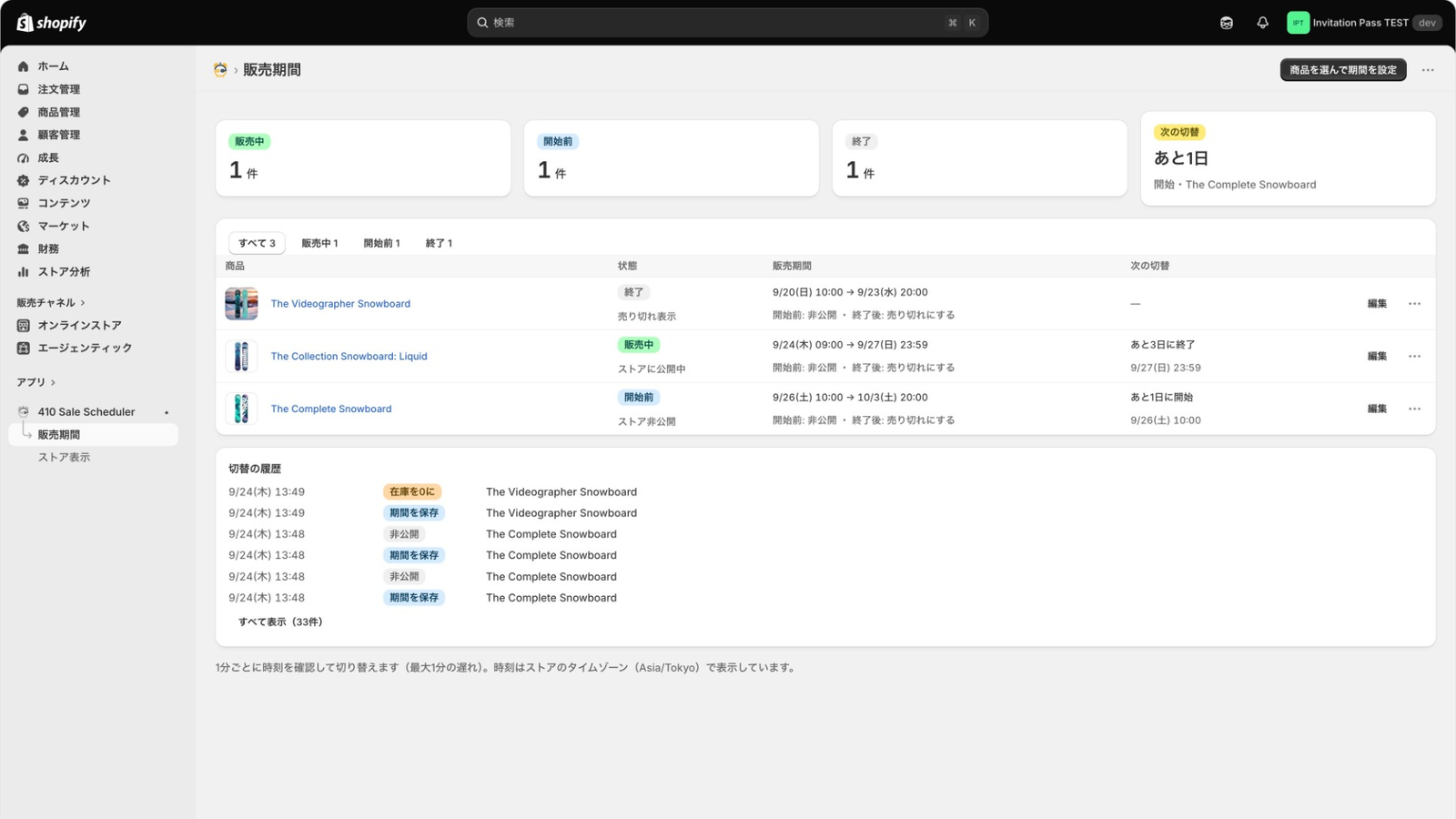
実際の画面で見てみる。
Shopifyの管理画面の中で、販売期間の設定から商品ページの表示まで完結します。
FEATURES
始まりから終わりまで、時間どおりに。
公開・終了の切り替えから、購入のブロック、失敗時の通知まで、410 Sale Scheduler がまとめて引き受けます。
分単位の販売期間設定
商品ごとに開始・終了日時を分単位で指定。複数の商品にまとめて設定することもできます。
終了後の動作を選べる
「非公開」「売り切れ(在庫0)」「表示したまま購入不可」から商品ごとに選択。売り切れにした商品は在庫を補充すれば販売を再開できます。
商品ページにカウントダウン
販売終了までの残り時間を商品ページに表示。残りわずかになると色が変わり、購入を後押しします。
キャンペーン中だけのお知らせバー
キャンペーン期間中だけ、ストア上部にお知らせバーを表示できます。
期間外の購入をブロック
販売期間外の商品は、カートとチェックアウトで購入できないようにします。カートに残った商品も買えません。
自動リトライとメール通知
切り替えに失敗しても毎分自動で再試行。失敗が続いたときはメールでお知らせします。
HOW IT WORKS
3ステップで、あとは任せるだけ。
-
STEP 01
アプリをインストール
Shopify App Store から、お使いのストアに追加します。
-
STEP 02
販売期間を設定
商品を選び、開始・終了日時と終了後の動作を指定。カウントダウンやお知らせバーもここで設定します。
-
STEP 03
時刻になったら自動で切り替え
開始時刻に公開、終了時刻に切り替え。販売中・販売予定・終了の状態は一覧で確認できます。
PRICING
シンプルな、ひとつのプラン。
すべての機能が使えるStandardプランのみ。まずは14日間、無料でお試しください。
Standard
14日間無料$19/ 月(30日ごとの請求)
- 商品ごとの開始・終了スケジュール
- 開始時の自動公開と、終了時の非公開・売り切れ・購入不可
- カウントダウンとお知らせバー
- 期間外の購入ブロック
- 切り替え失敗時のメール通知
FAQ
よくある質問
販売終了後、商品はどうなりますか?
「非公開にする」「売り切れにする(在庫0)」「表示したまま購入不可にする」の3つから、商品ごとに選べます。
カートに入ったままの商品は、終了後も買えてしまいませんか?
販売期間外の商品はカートとチェックアウトで購入がブロックされるため、カートに残っていても購入できません。
切り替えに失敗したらどうなりますか?
毎分自動で再試行します。失敗が続いた場合は、メールでお知らせします。
売り切れにした商品を、もう一度販売できますか?
はい。在庫を補充すれば販売を再開できます。
無料で試せますか?
14日間の無料体験があります。その後はStandardプラン(月額$19)です。
Shopify app · Automated limited-time sales
Go live on the minute.
End right on time.
Set a start and end time for each product, down to the minute. 410 Sale Scheduler publishes it to your online store when the sale starts and switches it automatically when it ends. No more taking limited-time products on and off by hand.
14-day free trial · Available in English and Japanese
THE PROBLEM
Running limited-time sales? Sound familiar?
Publishing and unpublishing by hand
Someone has to wait at the admin for every launch and every close.
Still purchasable from the cart
Even after you hide a product, items left in carts can still be ordered.
Switching errors go unnoticed
You only learn about a missed or failed switch when a customer tells you.
PRODUCT TOUR
See it in action.
Everything happens inside your Shopify admin — from setting sale periods to what shoppers see on the product page.
FEATURES
On time, from start to finish.
Publishing, switching, purchase blocking and failure alerts — 410 Sale Scheduler handles all of it.
Minute-level scheduling
Set start and end times per product, down to the minute — or apply them to many products at once.
Choose what happens at the end
Hide it, mark it sold out (inventory 0), or keep it visible but not purchasable. Restock a sold-out product to resume sales.
Countdown on product pages
Show the time left until the sale ends. The timer changes color when time is running out.
Campaign announcement bar
Show an announcement bar at the top of your store only while the campaign is running.
Out-of-period purchase blocking
Products outside their sale period can't be bought at cart or checkout — even if they're still sitting in a cart.
Auto-retry and email alerts
If a switch fails, it retries every minute. If failures continue, you get an email.
HOW IT WORKS
Three steps, then let it run.
-
STEP 01
Install the app
Add it to your store from the Shopify App Store.
-
STEP 02
Set the sale period
Pick products, set start and end times and what happens at the end. Set up the countdown and announcement bar here too.
-
STEP 03
It switches on time
Products go live at the start time and switch at the end time. See every product's status — live, scheduled or ended — in one list.
PRICING
One simple plan.
The Standard plan includes every feature. Try it free for 14 days.
Standard
14-day free trial$19/ month (billed every 30 days)
- Per-product start and end scheduling
- Auto-publish at start; hide, sell out or block at end
- Countdown and announcement bar
- Out-of-period purchase blocking
- Email alerts on switching failures
FAQ
Frequently asked questions
What happens to a product when the sale ends?
For each product, choose one of three: hide it, mark it sold out (inventory 0), or keep it visible but not purchasable.
Can customers still buy items left in their cart?
No. Products outside their sale period are blocked at cart and checkout, so they can't be purchased even if they're still in a cart.
What if a switch fails?
The app retries automatically every minute. If failures continue, you'll be notified by email.
Can I sell a sold-out product again?
Yes. Restock it and sales resume.
Is there a free trial?
Yes, 14 days. After that, the Standard plan is $19 per month.
Put your next limited-time sale
on schedule.
Install from the Shopify App Store and try it free for 14 days.